ISS Crew Contact Part 3 – Summary of Our Preparations

Nashua Area Radio Society preparations for our upcoming ISS Crew Contact at Hudson Memorial School (HMS) are almost complete. All of our gear is tested and packed, our press release is written, we’ve alterted local news media folks, the students have put together their questions, and have practiced for their contact.

Prioritized ISS Passes for our Crew Contact

We are just awaiting notification of the final date and time for our contact and we’ll begin final setup and testing at HMS.

We’ve been sharing our progress as we’ve on the Nashua Area Radio Society’s Youth Forum as we have worked through our final preparations. I also would like to share a summary here along with some insights on what we’ve learned along the way.

An ISS Crew Contact is No Small Undertaking …

Satellite Station 3.0 Antenna System
Satellite Station 3.0 Antenna System Test

We have been working for almost a year now to get ready for our contact. We’ve built and tested two space ground stations and we’ve discovered and addressed several performance and reliability issues with these stations during trial deployments at Field Day, Ham Fests, License Classes, and during testing here at our QTH.

Space Field Trip at HMS

Dan, AC1EN and the faculty team at HMS have expended a great deal of effort with the students at their school to prepare for our contact. Their activities have included:

  • Leading the ARISS Crew Contact Application Process for our contact
  • Integration of Radio Space Science concepts into their student curriculum
  • A Skype contact with a NASA Engineer
  • Visiting the Boston Museum of Science special exhibit on Space and the International Space Station
  • A High Altitude Balloon Project with the Nashua Area Radio Society to learn about Atmospheric Science and Space Communications
  • Space-related student projects including building rovers, participating in an egg drop, and having their pre-engineering program students work on solutions for the ISS
  • Holding a Field Astronomy and STEM night for students and building Amateur Radio into the school’s annual STEM Nights

Audio-Visual Elements are Important and as Challenging as the Ground Station Equipment…

Sound System Mixer
Sound System Mixer

We planned from the very start to provide a shared, multimedia experience as part of our contact. Our plans included:

  • Providing a professional-quality audio and video experience for the students, parents, and faculty members at HMS during our contact
  • Creating a high-quality Video Capture of our Contact
  • Live Streaming our Contact to Facebook so that more Students, Parents, and the Amateur Radio Community could participate in our contact in real-time

Dave, K1DLM who is a member of NARS had extensive professional sound experience and was able to help us with this part of our project.

Audio System for ISS Contactr
Audio System for ISS Contact

Dave put together a professional-level A-V system design to support our contact and provided much of the gear to realize the design. His uses a pair of communications microphones, a pro-mixer, and audio interface gear to provide student and radio audio to the sound system in the auditorium at HMS as well as to an array of video cameras. The system makes extensive use of XLR cabling and pro-level devices to ensure clean audio.

Video Presence on the Internet is an Important Element to Draw Interest in a Project Such as Ours…

We Live Streamed some of our Station Testing activities to Facebook and we were amazed at the interest and response that we received. Many folks worldwide followed our progress on Facebook in real-time as we set up and completed our full station test.

ISS Antenna Camera Test

We are planning to have two IP Video Cameras Live Streaming to Facebook during our contact. One in the room to provide video of the students as they talk with the astronaut on the ISS and a second on our antennas as they track the ISS.

Its Critically Important to Test the Complete Station Ahead Of Time – New Challenges Emerged when we Mixed Audio and Radio Gear…

Full Station Setup and Test

We set up the full station (Primary and Backup) along with all of the Audio and Video Gear about 3 weeks prior to our contact for a complete system test. We learned a great deal in doing this and we encountered several problems which we have since corrected.

On-Air Station Test
On-Air Station Test

The most important issues did not show themselves until we made some contacts with all of the A-V gear in place. We had problems with RF aggravated ground loops in the radio microphone circuits during the initial test. These problems did not show themselves until we added the audio mixer and sound system into the station.

Audio Isolation Transformer

These problems were easily corrected by adding Audio Isolation Transformers into the radio microphone circuits.

XLR Line to Microphone Level Attenuator

We also solved some potential issues related to level differences between line and microphone audio circuits using Audio Attenuators.

These problems were not difficult to solve but they would have seriously degraded our contact if we had not discovered them early while there was still plenty of time to secure parts and retest.

Data Networks in Schools and Public Places Require Configuration Adjustments to Support Contact Elements…

Data Network Test at HMS

Schools and other public places typically do a good job of protecting their data networks and users from threats from both the Internet and within the venue. Tracking Programs, IP Cameras for Live Streaming, and other contact support gear are not typical devices that would be in operation on such networks. Also, many public venues rely almost exclusively on WiFi for access to the Internet and typically prohibit or severely limit client devices from communicating with each other.

WiFi can often suffer from RF interference issues when many devices like Smart Phones are located together in a small area. This situation is common in large gatherings.

Data System for ISS Contact

Data System for ISS Contact

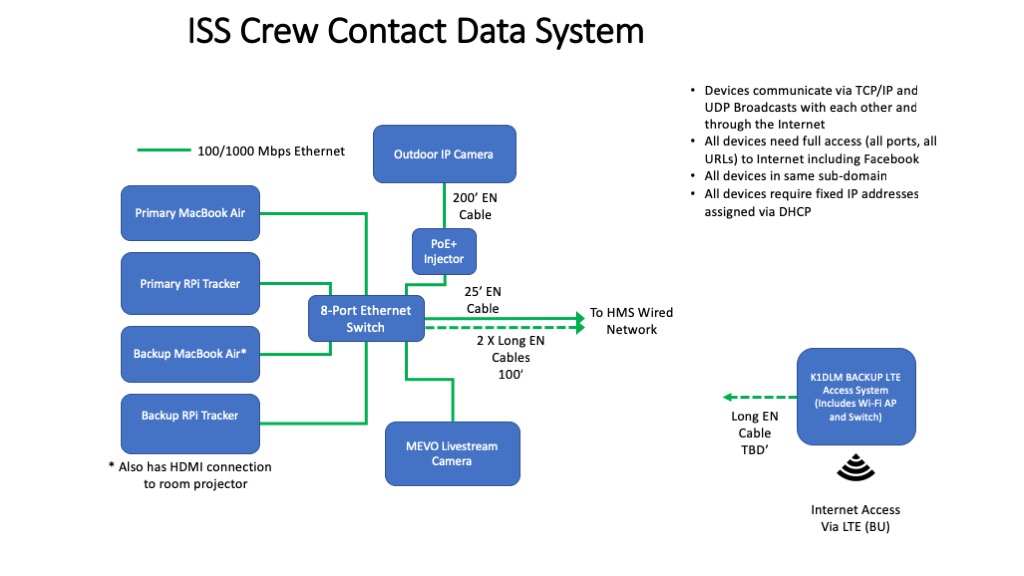
We had quite a bit of experience with these problems as part of other school projects we’ve done. We worked closely with the IT staff at HMS to plan for and create a network design to support our contact. We opted to use a wired network approach with a local Ethernet switch to implement the IP communications between the elements in our stations and the associated IP Cameras.

The IT team at HMS configured their network to ensure that the IP addresses of our devices were fixed in DHCP and that devices that needed access to the Internet had the access that they required. The IP cameras where the most challenging elements here.

Packed and Ready to Go…

Equipment Packing and Protection

Well, all of our gear is packed and ready to go for setup on-site at HMS. The next article in this series will cover the on-site set up for our contact.

Fred, AB1OC

ISS Crew Contact Part 1 – Ground Station Design and Construction

Satellite 3.0 Station Control Details
Ground Station for Satellites and the ISS

Our planned ISS Crew Contact is almost here! It will take place sometime during the first week of December (December 3rd – 8th) at the Hudson Memorial School (HMS) here in Hudson, NH. I am planning a series of articles here on our blog to explain the process for preparing our ground station(s) and making contact.

The Beginning

Dan Pooler, AC1EN who is a teacher at HMS began this process almost a year ago by reaching out to the Nashua Area Radio Society. Dan wanted to do an ISS Crew Contact at his school and asked if we would help him with the Amateur Radio elements.

We decided early on that we wanted a Direct contact (one which uses an on-site Amateur Radio Ground Station).

ARRIS Ground Station Recommendations

The first thing we did was to look at the ARISS Ground Station requirements document. We learned that we needed to build two Ground Stations – a Primary Station and a Backup Station. These requirements and our interest in Satellite Communications led to the construction of a series of Portable Space Ground Stations.

The Primary Station

The primary station requirements are as follows:

  • Transceiver with 50–100 W output, 1 kHz tuning steps, and 21 memories capable of storing split frequencies
  • Low-loss coax (such as 9913 or LMR-400)
  • Mast mounted receive pre-amplifier
  • 14-element yagi antenna with switchable circular polarity
  • Antenna rotators for azimuth (0–360°) and elevation (0–180°), with an interface for computer control
  • Computer running tracking software for antenna control (including flip mode operation)

The ARISS approach is to use a series of “secret” uplink frequencies which are determined and provided only to the contact operators before each contact. Doppler correction is not required on the 2m band where the crew contacts take place.

Our Portable 2.0 Satellite Station already existed, and it met many of these requirements with a notable exception:

14-element yagi antenna with switchable circular polarity

Satellite Antenna Details
Satellite Station 2.0 Antenna Details

Our 2.0 Station has an 8-element yagi with fixed polarity. This requirement turned out to have a much more significant impact on the design of the Primary Ground Station than just changing the antenna and ultimately led to the construction of our Portable Satellite Station 3.0. More on this in a minute…

The Backup Station

The backup station requirements are as follows:

  • Transceiver with 50–100 W output, 1 kHz tuning steps, and 21 memories capable of storing split frequencies
  • Power amplifier with 100–200W output (optional)
  • Low-loss coax
  • Mast mounted receive pre-amplifier
  • Omnidirectional antenna, either vertical (preferred) or eggbeater style
  • An uninterruptible power source (UPS or battery)

Our Approach

After consulting with the ARISS folks and some thought, we decided to use the then-current Satellite Station 2.0 as the Backup Station and build a new Satellite Station 3.0 for use as the Primary Station. This approach also involved installing a larger rotator to accommodate the larger antenna and a heavier fiberglass cross-boom. The 3.0 station would also receive a more capable antenna for the 70 cm band and add a 23 cm antenna for a third band.

The plan included upgrading the 2.0 Station Antennas to include switchable polarity and the addition of a 200W power amplifier for 2 m to compensate for the reduced gain of the smaller 8-element yagi in the 2.0 station.

Building The Primary Station

Satellite Station 3.0 Antenna System

The construction and testing of the 3.0 Station are well covered in articles on our Blog, so I’ll just share a little information about the final result. The new antenna system used the same ground-based roof tower arrangement that worked well for the 2.0 station. The larger 3.0 antennas are center mounted on a fiberglass cross boom to prevent the Boom from affecting the antenna patterns. We’ve also added a 23 cm loop yagi for a third band. The 3.0 antenna system also uses a more powerful Azimuth-Elevation Rotator from Alfa-Spid.

2m Yagi Switchable Polarity Feedpoint
2m Yagi Switchable Polarity feed point

The new 2 m and 70 cm antennas use relays at their feed point to enable remote switching of the antenna’s polarity between Left-Hand and Right-Hand circular polarity.

Satellite 3.0 Station Radio and Controls

The upgraded 3.0 ground station adds a control console for switching the polarity of the antennas and a custom-built PPT Router Device to manage PTT sequencing of the radio and the pre-amplifiers at the antennas.

Computer Control via MacDoppler

We continue to use the excellent MacDoppler software to control tracking and Doppler correction in the 3.0 Station.

Building The Backup Station

Upgraded 2.0 Antennas

The upgrades to the 2.0 Antenna System involved the installation of Polarity Switching relays in the feed points of the 2.0 antennas. This upgrade was a fairly straightforward one.

Backup Station Radio and Controls Test

The ground station side was more involved as we needed to build a complete second station. I was able to purchase an Icom IC-910H radio used in good condition for this purpose. The rest of the station components were similar to the Primary Station.

Backup Station Test at the Fall Tech Class

We tested the Backup Station at our Fall Technician License Class, and it worked great! several of our class students used the station to make their first satellite contacts.

I am working on adding a 2 m amplifier and improving the PTT sequencing system on the Backup Station, and I plan to post more about these upgrades here in the near future.

Audio System for Our Contact

Mixing Board at HMS
Mixing Board at HMS

Our contact will take place in the auditorium at HMS. The room has a high-quality sound system and a mixing board for audio.

Audio System for ISS Contact

Audio System for ISS Contact

Dave, K1DLM, is part of our ISS Crew Contact Team and has quite a bit of pro-level audio experience. He has put together the following plan for our Audio System. His design allows us to smoothly transfer audio to and from the Primary or the Back Stations. We are also planning to record a video and Livestream video to the N1FD Facebook page during our contact, and his design also supports these elements.

Data System for ISS Contact

The final element in our plan is the Data System. The network at HMS is very tightly controlled from a security point of view, making it difficult to use for contact critical functions like access to up-to-date Keplerian Elements for our straightforward. Dave has an LTE-based Internet Access System that we have used in the past and elected to use to support our stations. We are planning to use the HMS network to transport the Livestream video from our contact. We’ll be using a Mevo Internet Camera for this purpose.

A Million Details…

As you can probably imagine, many details go into making a project like this possible. Here’s a rough timeline of some of the major remaining steps from a Ground Station point of view:

  • Assemble both stations at our QTH with the 2m amplifier and the final 215′ control cables and feed lines – In progress and should be complete in a few days.
  • Full Station Test – add the Audio and Data System components and test the full station at our QTH – Within a week.
  • Configure and Test Data Network Access – for Live Streaming Video and the computers.
  • Set up Ground Station at HMS and perform Dry Run Test – Complete by December 1st.

Dan and the HMS faculty team are also very busy finalizing the student’s questions and handling press-related activities.

We hope our readers will join us via the Livestream video for our contact. We’ll post more on this as we get closer!

Fred, AB1OC

A Portable Satellite Station Part 7 – Plans for a 4.0 Station

Portable Satellite Station 3.0 Antenna System

Satellite Station 3.0 Antenna System

We have begun looking ahead to Satellite Station 4.0 and where we want to go next after our ARISS crew contact is complete. Our goals for the Satellite Station 4.0 include:

  • A permanently installed version of our 3.1 Station which can be operated remotely over the Internet
  • Upgraded Transceivers which add Pan Adapter/Waterfall display capabilities
  • Enhancements to our Transportable 2.1 Station for improved performance
  • A more portable version of our 1.1 Station for Grid Square Activations

New 4.0 Station at our Home QTH

The performance of the 3.1 Station’s antennas is very good but the antenna system is a handful to transport. We are planning to install these antennas on a new tower at our QTH and use our Flex-6700 SDR-based Remote Operating Gateway with some upgrades to create a remotely controlled satellite station that can be operated via the Internet. The main components of the 4.0 Station will include:

The new tower will also provide a new antenna system for the 6m band.

Updated Remote Operating Setup

Flex-6700 SDR-Based Remote Operating Setup

The Flex-6700 SDR and the associated Maestro Remote Unit will enable the 4.0 Station to be remotely operated through the Internet via a Laptop running MacDoppler.

Upgraded Transportable 2.2 Station

Upgrade plans for our Transportable station include the addition of remote switchable polarity relays and a new Icom IC-9700 Transceiver when it becomes available.

Polarity Switch Installed in LEO Pack Antennas

Polarity Switch Installed in LEO Pack Antennas

The polarity switches have been installed on the M2 Antennas 436CP16 and 2MCP8A antennas in our M2 Antennas LEO Pack. We use a DX Engineering EC-4 console to control the antennas’ LHCP or RHCP polarity selection. We have been doing some testing with the upgraded LEO pack, which includes the polarity switching capabilities, and we are seeing a significant improvement in performance.

Alfa Spid Az-El Rotator

AlfaSpid Az-El Rotator

We are also planning to move the upgraded LEO pack antennas to the current 3.1 Tower to take advantage of the AlfaSpid Rotator installed there.

Icom IC-7900 Transceiver

The other major upgrade planned for the 2.2 Station is the new Icom IC-9700 Transceiver when it becomes available. This radio will utilize Icom’s SDR platform and includes a Pan Adapter/Waterfall display which will be a very useful addition for operation with Linear Transponder Satellites.

Upgraded Portable 1.2 Station

We enjoy mountain topping and activating grid squares, so we are planning upgrades to our 1.2 Station for this purpose.

Our 1.2 Portable Satellite Station on Mt. Kearsarge

Our 1.2 Portable Satellite Station on Mt. Kearsarge

The 1.2 Station utilizes computer control to enable operation with linear transponder satellites and will use solar/battery power along with a 100w/70w Icom IC-910H Satellite Transceiver.

Solar Panels

Solar Panels

A pair of 90W foldable solar panels, an MPPT solar charger, and two LiPo 4S4P A123 batteries provide plenty of power to run the IC-910H Transceiver and the associated computer. The portable station also includes a pair of ARR preamps.

Portable Satellite Antenna System

Portable Satellite Antenna System

The antenna system we’ll be using is an Elk Portable Log Periodic 2m/70cm yagi on a camera tripod. Combining a compass and an angle finder gauge helps us correctly point the antenna.

As you can probably tell, all of these upgrades are in progress and at various completion stages. We will post updates here on our Blog as we continue to make progress. Here are links to some of these posts:

Fred, AB1OC

Working IC-9700 Shown In Tokyo

Working IC-9700 On Display In Tokyo

Working IC-9700 On Display In Tokyo

The IC-9700 is a new VHF/UHF radio based on the Software Defined Radio (SDR) platform Icom uses in the IC-7300 and IC-7610.

It looks like this is going to be an excellent radio for Satellite, EME, and other weak-signal work on the 2 m, 70 cm, and 23 cm bands. The IC-9700 features a pan adapter display which will be very useful for working contacts through linear satellites.

Based upon previous new Transceivers releases by Icom, I would guess we are at least 8 months to a year away from when this radio will be offered for sale in the USA.

Here’s some video of the forthcoming  IC-9700 as well as other gear from Icom. The video also features other new products and updated Firmware capabilities from Icom. Enjoy!

Fred, AB1OC

Upgrading our 2.0 Satellite Station for ARISS Contacts

We have been working with Hudson Memorial School near Nashua, NH, to prepare for a possible ISS crew contact. The ARISS folks work with schools and their Ham Radio helpers to prepare for these contacts. ARISS provides recommendations for ground station equipment to help ensure a good experience for the students. The ground station recommendations provide solid specifications to support communications with the ISS on the 2m band. The recommendations include things such as:

  • A requirement to build both a primary and a backup ground station
  • Radio and power specifications (a 200W amp is recommended)
  • Antenna specifications, including recommendations to provide for switchable LHCP and RHCP
  • Computer-controlled azimuth/elevation positioning of antennas to track the ISS
  • Use of a receive preamplifier at the antenna
Portable Satellite Station 3.0 Antenna System

Portable Satellite Station 3.0 Antenna System

We have recently completed the construction and testing of our Portable Satellite Station 3.0, built specifically to meet the primary station requirements for our ISS contact.

Our plan is to add some upgrades to our Portable Satellite Station 2.0 to create a Portable 2.1 Station that meets the backup station requirements. These upgrades will include:

All equipment needed to upgrade our 2.0 Portable Station to 2.1 is here or will arrive shortly. Here’s some more information on the planned equipment.

Icom IC-910H Transceiver

Icom IC-910H Transceiver

The Icom IC-910H was Icom’s flagship Transceiver for Satellite work before the IC-9100 was released. It’s a very nice satellite radio! Dave, K1DLM, graciously lent us his IC-910H for use in our backup station.

Green Heron RT-21 AZ/EL Rotator Controller

Green Heron RT-21 AZ/EL Rotator Controller

We already have a Green Heron Az/El Rotator controller setup for the Yaesu Rotator system on the 2.0 Antenna Tower, and we will be reusing it for the 2.1 station.

GHTracker Running On A Raspberry Pi 3

GHTracker Running On A Raspberry Pi 3

We are also planning to build a second Raspberry Pi Rotator Interface for it.

M2 Antenna Systems PS2MCP8A Polarity Switch

M2 Antenna Systems PS-2MCP8A Polarity Switch

M2 Antenna Systems recently added a new 2M polarity switch, the PS-2MCP8A, designed for use with the 2M antenna in their LEO Pack, which we use in our 2.0 Antenna System. We will install this relay and a PS-70CM polarity switch relay for the LEO pack’s 70cm antenna as part of the 2.1 Antena System upgrade.

DXEngineering EC-4 Control Box

DXEngineering EC-4 Control Box

We will add another DXEngineering EC-4 BCD Control Console to control the polarity switching relays on the upgraded antennas.

m RM ITALY LA-250V Amplifier

RM ITALY LA-250V Amplifier

The final new component in our 2.0 to 2.1 upgrade is the addition of a 200W RM ITALY LA 250 power amplifier. We have opted for the version of this amplifier with the cooling fans. The unit is very well made, and we are anxious to see how it performs on the air.

Some of our readers might be wondering what we are planning to do with all of the Portable Satellite Ground Station equipment in the long run? We plan on keeping the 1.0 Portable Station for grid square activations and demonstrations. Its simple, battery-powered approach and small antenna make it ideal for this work.

The upgraded 2.0 Portable Station with enhanced polarity switching will become our transportable station for License Class and Field Day use. It will be converted at the end of 2018 to use our Icom IC-9100 Transceiver, which is currently part of the 3.0 station.

We plan to use the Portable 3.0 Station throughout the year (2018) to support the planned ARISS contact, Field Day, and some demonstrations at local Ham Fests and schools. Once these are complete, we plan to permanently install it here at our QTH, and it will become our main satellite ground station at our home QTH.

You can view all the articles about our Portable Satellite Stations via the links below.

We will begin construction of the 2.1 upgraded station once a few remaining components arrive here. We plan to share more about the construction and initial testing of our 2.1 Portable Station here.

Fred, AB1OC

A Portable Satellite Station Part 6 – 3.0 Station Initial Contacts

Tech Class First 3.0 Portable Station Test

Tech Class First 3.0 Portable Station Test

With the construction of our Portable Satellite Station 3.0 complete, we’ve been looking forward to an opportunity to test the new setup. We chose the Nashua Area Radio Society’s recent Technician License Class as a good time to both test the new stations and to acquaint our Tech Class grads with one of the many things that they can do with their new licenses – amateur satellite operations.

Tech Class 3.0 Portable Satellite Antenna Test

Tech Class 3.0 Portable Satellite Antenna Test

The first transport of the new 3.0 station antenna system turned out to be simple. The booms and counterweights of the new antenna system are easily separated via the removal of a few bolts located at the cross-boom. This allowed the antennas feed-points, rotator loops and polarity switching connections to be removed and transported as complete assemblies. The separation of the longer-boom antennas into two sections also made transporting the antennas easier and made the antenna elements less prone to bending in transport. Setup and cabling of the new 3.0 antenna system as the class site was quick and simple.

The opportunities to make contacts during our Tech Class were limited but the new system performed well with one exception. We saw a higher than expected SWR readings on the 70cm yagi during transmit. We immediately suspected problems with one of the N connectors that were installed during the construction of the new system (component testing during assembly showed the SWR readings on the 70cm side of the system to be in spec.).

Portable Satellite Station 3.0 Antenna System

Portable Satellite Station 3.0 Antenna System

After the class, we set up the 3.0 system again at our QTH. Transport and re-assembly of the new system are somewhat easier and faster than our 2.0 portable station antenna setup is.

Satellite Antenna System 3.0 Connections

Satellite Antenna System 3.0 Connections

The 3.0 antenna system uses a similar connector bulkhead approach that we used previously. The rotator controls are handled via a single, 8-conductor cable and we have a new connection for the polarity switching controls on the 3.0 system yagis.

Rotator Loop Coax Retention System

Rotator Loop Coax Retention System

We have had some problems with the connections between the preamplifiers mounted at the antennas and the rotator loops which connect the antennas to them. This problem caused several failures in the associated N-connectors on the 2.0 portable antenna system so we fabricated a simple arrangement to prevent the rotation of the antennas from turning the coax inside the N-connectors and causing these failures.

70cm Yagi SWR in the Satellite Sub-Band

70cm Antenna and Feedline SWR in the Satellite Sub-Band

Some isolation tests were performed on each cabling element of the 70cm side of the 3.0 antenna system and this resulted in the location of an improperly installed N-connector. The faulty connector was easily replaced and this corrected the SWR readings on the 70cm side of the antenna system. The image above shows the SWR readings for the 70cm antenna after the faulty connector was replaced. We checked the SWR performance with the 70cm yagi set for both Left-Hand and Right-Hand Circular Polarization and we saw good results in both configurations.

2m Yagi SWR in the Satellite Sub-Band

2m Antenna and Feedline SWR in the Satellite Sub-Band

We also re-checked the SWR performance of the 2m side of the antenna system with the 2m yagi in both polarity settings and it looked good as well.

Portable Satellite Antenna 3.0 Az-El Rotator

Portable Satellite Antenna 3.0 Az-El Rotator

The 3.0 antenna system uses an Alfa-Spid rotator. The Alfa-Spid can handle the additional weight of the larger yagis and has a more precise pointing ability (1° accuracy) which is helpful given the tighter patterns of the larger, 3.0 yagis.

70cm Yagi Switchable Polarity Feedpoint

70cm Yagi Switchable Polarity Feedpoint

The new yagis in the 3.0 antenna system have feed point arrangements which allow the polarity of the yagis to be switched between Left-Hand Circular Polarity (LHCP) and Right-Hand Circular Polarity (RHCP). These antennas used a relay arrangement at the feed-points that flip the polarity of one plane of the yagis by 180° which in turn changes the polarity of the antennas between LHCP and RHCP.

Portable Satellite Station 3.0 Radio and Controls

Portable Satellite Station 3.0 Radio and Controls

With the SWR problem corrected, we set up the 3.0 station radio and controls. The 3.0 station adds our homebuilt PTT Router and the control box from DXengineering which controls polarity switching. Also, the Green Heron rotator control box has been configured to control the new Alfa-Spid rotator.

POrtable Satellite Station 3.0 Computer Control via MacDoppler

Portable Satellite Station 3.0 Computer Control via MacDoppler

We are continuing to use the excellent MacDoppler software to control the 3.0 station. MacDoppler provides tracking controls for the antennas and doppler correction for the Icom-9100 transceivers uplink and downlink VFOs.

Satellite 3.0 Station Control Details

Satellite 3.0 Station Control Details

The image above shows a closer view of the 3.0 station controls. The box in the middle-left with four LEDs and the knob is used to select one of four polarity configurations for the 2m and 70cm yagis – RHCP/RHCP, LHCP/RHCP, RHCP/LHCP, or LHCP/LHCP. Just to the right in the middle stack is our homebrewed PTT Router which expands and improves the PTT sequencing performance of the station. Our station also uses a WaveNode WN-2 for SWR and power monitoring.

So how does the new 3.0 station perform? The new antennas have a tighter pattern requiring careful pointing calibration of the rotators during setup. This is easy to do with the Alfa-Spid rotator. The new antennas have noticeable more gain as compared to the LEO pack used on the 2.0 station. We are also surprised to see how much difference the polarity switching capability makes in certain situations – sometimes as much as two S units (12 dB) in certain situations. The combination of the new antennas and selection of the best polarity combination allows solid operation on many satellites passes with as little as 2 watts of uplink power. We have made a little over 50 QSOs on the new 3.0 station so far and it works great! For more information on the Portable 3.0 Station as well as the 2.0 and 1.0 stations that we’ve built – see the links below:

Fred, AB1OC

PTT Router for Satellite Station 3.0

ARR Satellite Preamp

Advanced Receiver Research Remote Preamp

Our Satellite Station 2.0 antenna system uses a pair of Advanced Receiver Research Remote preamplifiers at the antennas to boost weak signals. These preamps have RF sensing and switching to protect them during transit. While this system works well; we are always concerned about the impact of the RF power affecting the long-term reliability of these devices and the associated radio equipment.

M2 Antenna Systems S3 Sequencers

M2 Antenna Systems S3 Sequencers

Our Satellite Station 2.0 uses a pair of M2 Antenna Systems S3 Sequencers to control the preamps remotely. For U/V and V/U mode satellites, it’s simple to turn off the uplink band preamp to protect it against RF during transmission. The problem with this approach comes when working satellites and the International Space Station in simplex (single band) modes. In these situations, we need a solution that keys the sequencers externally so that the sequencers can properly control the changeover of the preamps from receive to transmit mode before keying our radio (an Icom IC-9100). We also wanted a solution that could also allow the radio to initiate the keying of the sequencers for CW break-in keying and digital modes.

PTT Router

PTT Router

Our solution was to design and build a simple Push-To-Talk (PTT) router. This device allows an external source, such as a footswitch or a trigger switch, to initiate the keying. The design also includes indicators that confirm that the keying sequence has been completed.

PTT Router Schematic Diagram

PTT Router Schematic Diagram

Our first step was to create a simple design that allowed an external switch or the radio to initiate keying. The PTT source switch (S1) selects the keying source and uses the Hsend  (2m key) and Vsend (70cm/1.2 GH key) lines on the Icom IC-9100 accessory jack as either the means to key the radio or the means to detect that the radio has initiated a transmit keying sequence. A second switch (S2) selects which VFO is keyed when the keying source switch (S1) is in External mode. Finally,  indicators for power and keying complete were added.

Rear Panel Connectors

Rear Panel Connectors

A small enclosure was used to house the switches, indicators, and connections to the rest of our Satellite Station. The image above shows the rear-panel connections to external PTT sources, the S3 Sequencers, the IC-9100 Radio, and a 12 Vdc station power source.

PTT Router Internal View

PTT Router Internal View

A pair of terminal strips were mounted inside the enclosure to make connecting all components easier. The wiring around the front and rear panels is pretty dense, so connections were insulated with heat shrink tubing. A small PCB could easily be created to make replicating the prototype easier should we build more copies of the design.

Satellite Station 3.0 Controls

Satellite Station 3.0 Controls

Our new PTT router was easy to integrate into our Satellite Station 3.0 setup. Integration required custom cables to connect our PTT router to the sequencers and the accessory jack of the radio. With the integration completed, we are now able to properly sequence the control of the preamps and the radio in all modes of operation. Here are some more articles which include more about our portable satellite stations –

Fred, AB1OC

A Portable Satellite Station Part 5 – Plans for Our 3.0 Station

Satellite Grids Worked

Satellite Grids Worked

We’ve made about 250 contacts with our Portable Satellite Station 2.0 and we have worked 106 grids which should be enough to earn a Satellite VUCC. The picture above shows the grids that we’ve worked via Satellites. We’ve learned a lot about satellite operation and had a great deal of fun in the process!

Portable Satellite Station 2.0 Goals

Portable Satellite Station 2.0 Goals

We’ve met all of our original goals for our 2.0 Station and we’ve used it portable at License Classes, Field Day, and other Amateur Radio Demonstrations. We’ve also shared presentations about our 2.0 Station with Amateur Radio Groups here in the New England area. The question that we get most often about the 2.0 Station is “What are your plans for the Portable Satellite Station 3.0”?

Portable Satellite Station 3.0 Goals

Portable Satellite Station 3.0 Goals

Well, here is the plan. We are working with a local group to secure and host an ISS Crew contact. The ARISS folks have published ground station requirements for these contacts. Here are the primary station requirements:

  • Transceiver with 50–100 W output, 1 kHz tuning steps, and 21 memories capable of storing split frequencies
  • Low-loss coax (such as 9913 or LMR-400)
  • Mast-mounted receive pre-amplifier
  • 14-element yagi antenna with switched circular polarity
  • Antenna rotators for azimuth (0–360°) and elevation (0–180°), with an interface for computer control
  • Computer running tracking software for antenna control (including flip mode operation)

Fortunately, our 2.0 Station meets or exceeds almost all of the primary station requirements with the exception of the antennas. The required antenna upgrades will shape the plans for our Portable Satellite Station 3.0.

M2 Antenna Systems 2MCP14

M2 Antenna Systems 2MCP14

ISS Crew Contacts are conducted using 2m Simplex radios on the ISS. We choose the 14-element circularly polarized 2MCP14 yagi from M2 Antenna Systems to meet the ARISS requirements for 2m. Here are the specifications for this antenna:

2MCP14 Antenna Specifications

2MCP14 Antenna Specifications

The 2MCP14 antenna offers a good balance between gain (12.34 dBi) and boom length (10′-6″) and is near the size limit that is practical for use in our Portable Station. This antenna provides an additional 3.14 dBi of gain compared to the M2 Antenna Systems 2MCP8A yagi which we are currently using in the 2.0 Station.

M2 Antenna Systems 436CP30

M2 Antenna Systems 436CP30

While not required for an ARISS Crew Contact, we are also going to upgrade the 70cm yagi to a 30-element circularly polarized M2 Antenna Systems 436CP30 yagi. Here are the specifications for this antenna:

436CP30 Antenna Specifications

436CP30 Antenna Specifications

This antenna is a good match for the upgraded 2m yagi. The 436CP30 has a boom length of 9′-9″ and a gain of 15.50 dBi. This antenna will provide an additional 2.2 dBi of gain compared to the M2 Antenna Systems 436CP16 yagi which we are currently using in the 2.0 Station.

Satellite Antennas Setup Portable

Satellite Antennas Setup Portable

The new antennas will require some modifications to our portable antenna system arrangement. They will need to be mounted on a cross-boom near their centers. As a result, a non-conductive fiberglass cross boom will be required to avoid problems with pattern distortion.

FGCB60 Non-Conductive Cross Boom

FGCB60 Non-Conductive Cross Boom

We will be using an M2 Antenna Systems FGCB60 Cross Boom which has removable, non-conductive end sections made from fiberglass material. The removable ends will make it easier to transport the antenna system. We will also need to make a new mast which is 24″ longer than our current one in the 2.0 Station to create the needed ground clearance for the longer antennas.

Alfa Spid Az-El Rotator

Alfa Spid Az-El Rotator

We are also planning to use a larger Alfa Spid Az-El Rotator. This unit will handle the extra weight of the longer yagi antennas and cross boom assembly and is more precise than the Yaesu unit used on the 2.0 station.

PS-2M and PS-70CM Polarity Switches

PS-2M and PS-70CM Polarity Switches

The last piece of the 3.0 Station Antenna upgrade is to add switchable left-hand and right-hand circular polarity. This will be accomplished via M2 Antenna Systems PS-2M and PS-70CM switchable polarity feed point upgrades for the 3.0 yagis.

DXEngineering EC-4 Control Box

DXEngineering EC-4 Control Box

We have a DXEngineering EC-4 Control Box from a previous project and we can use it to control the relays in the Polarity Switches which will be part of the 3.0 Station antennas. The box will allow us to select any combination of left and right-hand circular polarization on the 3.0 Station uplink and downlink antennas.

We should have all of the parts here for the 3.0 upgrade by the end of the year. We’ll post more as the project proceeds. Other articles in the Portable Satellite Station series include:

You may also be interested in the satellite station at our home QTH. You can read more about that here.

Fred, AB1OC

Raspberry Pi Satellite Rotator Interface

MacDoppler and GHTracker

MacDoppler and GHTracker

We’ve been using our Portable Satellite Station 2.0 for some time now, and it works great. One area that can be improved is the interface between the MacDoppler Satellite Tracking program we use and the GHTracker application, which controls the Green Heron Engineering RT-21 Az/El Rotator Controller in our setup. Our initial approach was to run the GHTracker app under Windows/VMWare on the same MacBook Air laptop that runs MacDoppler. While this approach works ok, it was more complex and less reliable than we had hoped.

Fortunately, MacDoppler and GHTracker use a UDP-based interface that will run over an IP network.

GHTracker Running On A Raspberry Pi 3

A Raspberry Pi Satellite Rotator Interface – GHTracker Running On A Raspberry Pi 3

Anita, AB1QB, got great results using a Raspberry Pi 2 with a Touch Screen for her DX Alarm Clock Project, so I decided to do something similar with GHTracker. The new Raspberry Pi 3 Model B boards feature a built-in WiFi networking interface and four USB ports, making the RPi 3 a perfect platform for this project. An email exchange with Jeff at Green Heron Engineering confirmed that GHTracker could run under Linux on the Raspberry Pi (RPi).

We wanted a compact package that did not require anything but a power supply to run the final project. There are many great parts available for building a Raspberry Pi system. Here’s what we used:

The total cost for all of the parts was $120.

The assembly of the case and the hardware was straightforward. The folks at Adafruit provide a pre-built Jesse Linux image for the RPi, including the necessary driver for the Touch Screen Display.

After some configuration work and creating a few shell scripts to make it easy to boot the RPi to an HDMI display or to the Touch Display, we were ready to install the GH Tracker App. We also enabled the VNC Server on the RPi to use a VNC Client application on our MacBook Air instead of directly connecting a display, keyboard, and mouse to the RPi. Finally, we installed Samba on our RPi to allow files to be moved between our other computers and the RPi.

GHTracker Running on the Raspberry Pi

GHTracker Running on the Raspberry Pi

Jeff at Green Heron Engineering provided a copy of GHTracker V1.24 and the necessary serial interface library to enable its use on the RPi. Jeff is planning to make a tar file available with GH Tracker and the library in the near future. We did some configuration work on LXDE (the GUI interface for Linux that runs on the RPi), and it automatically runs GH Tracker whenever the RPi is booted up. We also optimized the GUI for the sole purpose of running GH Tracker on the Touch Screen Display. Finally, we configured the Ethernet and WiFi interfaces on the RPi to work with our home network and LTE Hotspot modem.

RPi GHTracker Test Setup

RPi GHTracker Test Setup

With all the software work done, it was time to test the combination with our Satellite Rotator System. The setup worked on the first try using a WiFi network connection between the MacBook Air Laptop running MacDoppler and the RPi. The USB-based serial ports, which control the Azimuth and Elevation direction of the rotators, worked as soon as they were plugged into the RPi. Also, the touchscreen interface works well with the GH Tracker App making the combination easy to use.

MacDoppler and GHTracker via VNC

MacDoppler and GHTracker via VNC

The VNC Client/Server combination allows us to work with the software on the RPi right from our MacBook Air laptop. It also makes for a nice display for monitoring the GHTracker App’s operation from the Mac.

You can find information about how to build your own Raspberry Pi Satellite Rotator Interface here.

Other articles in the Portable Satellite Station series include:

You may also be interested in the satellite station at our home QTH. You can read more about that here.

Thanks to the help from Jeff at Green Heron Engineering, this project was very easy to do and worked out well. The Raspberry Pi 3 platform is powerful and relatively easy to work with. It makes a great start for many Ham Radio projects. Also, there is a wealth of online documentation, how-to information, and open-source software for the RPi. I hope that some of our readers will give the RPi a try!

Fred, AB1OC